SAMSUNG LAUNCHED THEIR FIRST ANDROID GALAXY TAB 2 (7.0)
Samsung said that this is their first ever tablet that will be powered by Android 4.0 Ice Cream Sandwich. In this new tablet, variety of new and improved Android OS features.

EFFECT OF TECHNOLOGY IN OUR LIVES
Image below shows how technology affect to each on of us. Some people thought that it made them happy. But for some other people, technology gives them headache. Why headache?

Samsung will be Launching Galaxy S4
It's not just the Apple that was having a big break in the technology world. For according to Korea Times, Samsung Electronics will also be unveiling its ace card, the Galaxy S4, this coming February 2013 during the European Technology Exhibition at Mobile World Congress in Barcelona.


Showing posts with label Apple. Show all posts
Showing posts with label Apple. Show all posts
18 September, 2012
 11:37 AM

14 September, 2012
The Next Generation of iPhone, iPhone 10...???
Last September 12, Apple officially announced their latest iPhone, the thinnest and lightest iPhone they've ever created, iPhone 5. But what do you think apple will do in the next few years? Do you think they will still be upgrading the iPhone? Well, we have different perspectives. But since after the announcement of iPhone 5, a picture has been rolling in mostly all social network sites. This picture shows a prediction of the upcoming generation of iPhone. They call it as iPhone 10, The Tallest iPhone "Yet".


13 September, 2012
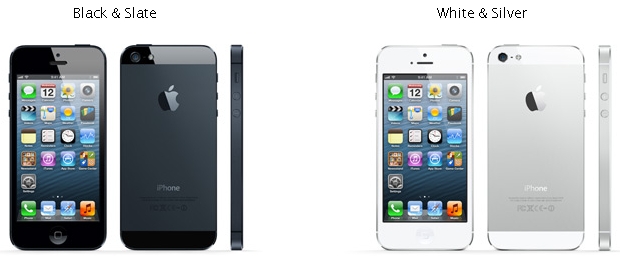
iPhone 5 Specs
Most of us already knew that Apple already announced about their latest iPhone, iPhone 5. With that, base on their website, below the specs of iPhone 5.
Color:
 Capacity and Price:

 Battery:
Language Support
Color:

- 16GB = $199
- 32GB = $299
- 64GB = $399
- Height: 4.87 inches (123.8 mm)
- Width: 2.31 inches (58.6 mm)
- Depth: 0.30 inch (7.6 mm)
- Weight: 3.95 ounces (112 grams)
- GSM model A1428*: UMTS/HSPA+/DC-HSDPA (850, 900, 1900, 2100 MHz); GSM/EDGE (850, 900, 1800, 1900 MHz); LTE (Bands 4 and 17)
- CDMA model A1429*: CDMA EV-DO Rev. A and Rev. B (800, 1900, 2100 MHz); UMTS/HSPA+/DC-HSDPA (850, 900, 1900, 2100 MHz); GSM/EDGE (850, 900, 1800, 1900 MHz); LTE (Bands 1, 3, 5, 13, 25)
- GSM model A1429*: UMTS/HSPA+/DC-HSDPA (850, 900, 1900, 2100 MHz); GSM/EDGE (850, 900, 1800, 1900 MHz); LTE (Bands 1, 3, 5)
- 802.11a/b/g/n Wi-Fi (802.11n 2.4GHz and 5GHz)
- Bluetooth 4.0 wireless technology
- Assisted GPS and GLONASS
- Digital compass
- Wi-Fi
- Cellular
- Retina display
- 4-inch (diagonal) widescreen Multi-Touch display
- 1136-by-640-pixel resolution at 326 ppi
- 800:1 contrast ratio (typical)
- 500 cd/m2 max brightness (typical)
- Fingerprint-resistant oleophobic coating on front
- Support for display of multiple languages and characters simultaneously
- 8-megapixel iSight camera
- Panorama
- Video recording, HD (1080p) up to 30 frames per second with audio
- FaceTime HD camera with 1.2MP photos and HD video (720p) up to 30 frames per second
- Autofocus
- Tap to focus video or still images
- Face detection in video or still images
- LED flash
- Improved video stabilization
- Photo and video geotagging


- Built-in rechargeable lithium-ion battery
- Charging via USB to computer system or power adapter
- Talk time: Up to 8 hours on 3G
- Standby time: Up to 225 hours
- Internet use: Up to 8 hours on 3G, up to 8 hours on LTE, up to 10 hours on Wi-Fi
- Video playback: Up to 10 hours
- Audio playback: Up to 40 hours
- Audio formats supported: AAC (8 to 320 Kbps), Protected AAC (from iTunes Store), HE-AAC, MP3 (8 to 320 Kbps), MP3 VBR, Audible (formats 2, 3, 4, Audible Enhanced Audio, AAX, and AAX+), Apple Lossless, AIFF, and WAV
- User-configurable maximum volume limit
- AirPlay Mirroring to Apple TV support at 720p
- AirPlay video streaming to Apple TV (3rd generation) at up to 1080p and Apple TV (2nd generation) at up to 720p
- Video formats supported: H.264 video up to 1080p, 30 frames per second, High Profile level 4.1 with AAC-LC audio up to 160 Kbps, 48kHz, stereo audio in .m4v, .mp4, and .mov file formats; MPEG-4 video up to 2.5 Mbps, 640 by 480 pixels, 30 frames per second, Simple Profile with AAC-LC audio up to 160 Kbps per channel, 48kHz, stereo audio in .m4v, .mp4, and .mov file formats; Motion JPEG (M-JPEG) up to 35 Mbps, 1280 by 720 pixels, 30 frames per second, audio in ulaw, PCM stereo audio in .avi file format
- Apple EarPods with Remote and Mic
- Storage and travel case
- iPhone 5 (Model A1428): M3, T4
- iPhone 5 (Model A1429): M4, T4
Viewable Document Types:
.jpg, .tiff, .gif (images); .doc and .docx (Microsoft Word); .htm and .html (web pages); .key (Keynote); .numbers (Numbers); .pages (Pages); .pdf (Preview and Adobe Acrobat); .ppt and .pptx (Microsoft PowerPoint); .txt (text); .rtf (rich text format); .vcf (contact information); .xls and .xlsx (Microsoft Excel)
Sensors:.jpg, .tiff, .gif (images); .doc and .docx (Microsoft Word); .htm and .html (web pages); .key (Keynote); .numbers (Numbers); .pages (Pages); .pdf (Preview and Adobe Acrobat); .ppt and .pptx (Microsoft PowerPoint); .txt (text); .rtf (rich text format); .vcf (contact information); .xls and .xlsx (Microsoft Excel)
- Three-axis gyro
- Accelerometer
- Proximity sensor
- Ambient light sensor
- Apple ID (required for some features)
- Internet access5
- Syncing with iTunes on a Mac or PC requires:
- Mac: OS X v10.6.8 or later
- PC: Windows 7; Windows Vista; or Windows XP Home or Professional with Service Pack 3 or later
- iTunes 10.7 or later (free download from www.itunes.com/download)
- Operating ambient temperature: 32° to 95° F (0° to 35° C)
- Nonoperating temperature: −4° to 113° F (−20° to 45° C)
- Relative humidity: 5% to 95% noncondensing
- Maximum operating altitude: 10,000 feet (3000 m)
Language Support
- English (U.S.)
- English (UK)
- Chinese (Simplified)
- Chinese (Traditional)
- French
- German
- Italian
- Japanese
- Korean
- Spanish
- Arabic
- Catalan
- Croatian
- Czech
- Danish
- Dutch
- Finnish
- Greek
- Hebrew
- Hungarian
- Indonesian
- Malay
- Norwegian
- Polish
- Portuguese
- Portuguese (Brazil)
- Romanian
- Russian
- Slovak
- Swedish
- Thai
- Turkish
- Ukrainian
- Vietnamese
- English (U.S.)
- English (UK)
- Chinese - Simplified (Handwriting, Pinyin, Stroke)
- Chinese - Traditional (Handwriting, Pinyin, Zhuyin, Cangjie, Stroke)
- French
- French (Canadian)
- French (Switzerland)
- German (Germany)
- German (Switzerland)
- Italian
- Japanese (Romaji, Kana)
- Korean
- Spanish
- Arabic
- Bulgarian
- Catalan
- Cherokee
- Croatian
- Czech
- Danish
- Dutch
- Emoji
- Estonian
- Finnish
- Flemish
- Greek
- Hawaiian
- Hebrew
- Hindi
- Hungarian
- Icelandic
- Indonesian
- Latvian
- Lithuanian
- Macedonian
- Malay
- Norwegian
- Polish
- Portuguese
- Portuguese (Brazil)
- Romanian
- Russian
- Serbian (Cyrillic/Latin)
- Slovak
- Swedish
- Thai
- Tibetan
- Turkish
- Ukrainian
- Vietnamese
- English (U.S.)
- English (UK)
- Chinese (Simplified)
- Chinese (Traditional)
- French
- French (Canadian)
- French (Switzerland)
- German
- Italian
- Japanese (Romaji, Kana)
- Korean
- Spanish
- Arabic
- Catalan
- Cherokee
- Croatian
- Czech
- Danish
- Dutch
- Estonian
- Finnish
- Flemish
- Greek
- Hawaiian
- Hebrew
- Hindi
- Hungarian
- Indonesian
- Latvian
- Lithuanian
- Malay
- Norwegian
- Polish
- Portuguese
- Portuguese (Brazil)
- Romanian
- Russian
- Slovak
- Swedish
- Thai
- Turkish
- Ukrainian
- Vietnamese
- English (U.S., UK, Canada, Australia)
- Spanish (U.S., Mexico, Spain)
- French (France, Canada, Switzerland)
- German (Germany, Switzerland)
- Italian (Italy, Switzerland)
- Japanese
- Korean
- Mandarin (Mainland China, Taiwan)
- Cantonese (Hong Kong)
- iPhone 5
- Apple EarPods with Remote and Mic
- Lightning to USB Cable
- USB Power Adapter
- Documentation
- Lightning to 30-pin Adapter
- Connect your current accessories to iPhone 5 using this adapter.
- Apple World Travel Adapter Kit
- Plug your Apple power adapter into most electrical outlets around the world.
17 February, 2012
iPHONE APPS IS COPYING all CONTACTS FROM USER'S ADDRESS BOOK WITHOUT PERMISSION

This incident was exposed when Arun Thampi, an app developer from Singapore, noticed that his contacts were copied from his iPhone by a social network called Path. The thing is it didn't ask for his permission prior of copying. Path CEO Dave Morin responded to the concern by apologizing of the said incident.
Other social networks that were reported of copying the contacts from the address book were Facebook, Twitter, Foursquare, Instagram, Soodspotting and Yelp.
For this incident, two congressmen from United States, Energy and Commerce Committee Ranking Member Henry A. Waxman and Commerce, Manufacturing, and Trade Subcommittee Ranking Member G. K. Butterfield, sent a letter directly to the Apple Inc CEO Tim Cook asking if this copying of consumers address book is allowed to Apple's IOS App Developer Policies and Practices.
Cook was asked by Waxman and Butterfield to submit a full report explaining the incident not later than February 29, 2012.
Below is the copy of the letter from the two Congressmen sent to Mr. Cook. This letter was posted in butterfield.house.gov
February 15, 2012
Mr. Tim Cook
Chief Executive Officer, Apple Inc.
1 Infinite Loop
Cupertino, CA 95014
Dear Mr. Cook:
Last week, independent iOS app developer Arun Thampi blogged about his discovery that the social networking app “Path” was accessing and collecting the contents of his iPhone address book without ever having asked for his consent.[1] The information taken without his permission – or that of the individual contacts who own that information – included full names, phone numbers, and email addresses.[2] Following media coverage of Mr. Thampi’s discovery, Path’s Co-Founder and CEO Dave Morin quickly apologized, promised to delete from Path’s servers all data it had taken from its users’ address books, and announced the release of a new version of Path that would prompt users to opt in to sharing their address book contacts.[3] This incident raises questions about whether Apple’s iOS app developer policies and practices may fall short when it comes to protecting the information of iPhone users and their contacts.
The data management section of your iOS developer website states: “iOS has a comprehensive collection of tools and frameworks for storing, accessing, and sharing data. . . . iOS apps even have access to a device’s global data such as contacts in the Address Book, and photos in the Photo Library.”[4]The app store review guidelines section states: “We review every app on the App Store based on a set of technical, content, and design criteria. This review criteria is now available to you in the App Store Review Guidelines.”[5] This same section indicates that the guidelines are available only to registered members of the iOS Developer Program.[6] However, tech blogs following the Path controversy indicate that the iOS App Guidelines require apps to get a user’s permission before “transmit[ting] data about a user”.[7] In spite of this guidance, claims have been made that “there’s a quiet understanding among many iOS app developers that it is acceptable to send a user’s entire address book, without their permission, to remote servers and then store it for future reference. It’s common practice, and many companies likely have your address book stored in their database.”[8] One blogger claims to have conducted a survey of developers of popular iOS apps and found that 13 of 15 had a “contacts database with millions of records” – with one claiming to have a database containing “Mark Zuckerberg's cell phone number, Larry Ellison’s home phone number and Bill Gates’ cell phone number.”[9]
The fact that the previous version of Path was able to gain approval for distribution through the Apple iTunes Store despite taking the contents of users’ address books without their permission suggests that there could be some truth to these claims. To more fully understand and assess these claims, we are requesting that you respond to the following questions:
- Please describe all iOS App Guidelines that concern criteria related to the privacy and security of data that will be accessed or transmitted by an app.
- Please describe how you determine whether an app meets those criteria.
- What data do you consider to be “data about a user” that is subject to the requirement that the app obtain the user’s consent before it is transmitted?
- To the extent not addressed in the response to question 2, please describe how you determine whether an app will transmit “data about a user” and whether the consent requirement has been met.
- How many iOS apps in the U.S. iTunes Store transmit “data about a user”?
- Do you consider the contents of the address book to be “data about a user”?
- Do you consider the contents of the address book to be data of the contact? If not, please explain why not. Please explain how you protect the privacy and security interests of that contact in his or her information.
- How many iOS apps in the U.S. iTunes Store transmit information from the address book? How many of those ask for the user’s consent before transmitting their contacts’ information?
- You have built into your devices the ability to turn off in one place the transmission of location information entirely or on an app-by-app basis. Please explain why you have not done the same for address book information.
Please provide the information requested no later than February 29, 2012. If you have any questions regarding this request, you can contact Felipe Mendoza with the Energy and Commerce Committee Staff at 202-226-3400.
Sincerely,
Henry A. Waxman
Ranking MemberG.K. Butterfield
Ranking Member
Subcommittee on Commerce, Manufacturing, and Trade
cc: Dave Morin
Path, Co-Founder and CEO
14 February, 2012
HISTORY OF APPLE
Apple is one of the greatest technologies evolving as of this time. But do you all knew about the history of Apple? Do you know how the previous product of Apple look like? Look at the gif picture below if you want to know. This picture was posted by Funny Or Die in Google+
.gif)
.gif)


